| Chapter 21. Scripting Assistant | ||
|---|---|---|
 |  | |
| Chapter 21. Scripting Assistant | ||
|---|---|---|
| | | |
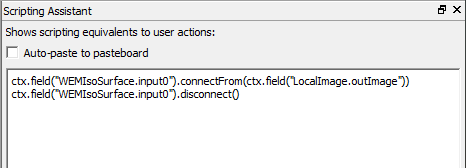
The Scripting Assistant is a useful tool which translate actions (like (dis-)connecting modules or parameter fields, setting parameter values) into the corresponding scripting commands.
Auto-paste to clipboard: If selected, the Python code resulting from an interaction in the network is automatically pasted to the clipboard, ready to be used in other editors.
© 2023 MeVis Medical Solutions AG
| | | |
| Chapter 20. Scripting Console |  | Chapter 22. Search in Network |