| 4.2. Edit Menu | ||
|---|---|---|
 | Chapter 4. Menu Bar |  |
| 4.2. Edit Menu | ||
|---|---|---|
| | Chapter 4. Menu Bar | |
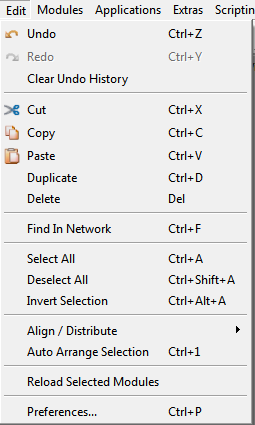
For editing modules, module groups and connections, the typical text edit shortcuts for each platform can be used. See Section 4.3.10, “Preferences — Shortcuts”.
Cuts the selected subnetwork from the current network. The subnetwork is cached with all connections and field values of the contained modules.
Copies the selected subnetwork in the current network. The subnetwork is cached with all connections and field values of the contained modules.
Inverts the selection by selecting all currently unselected modules and deselecting all selected modules in the current network.
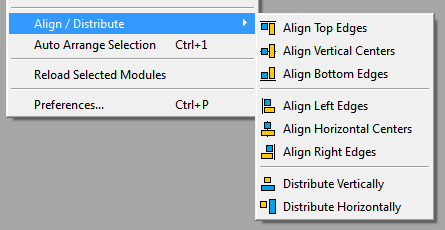
Aligns along centers and edges of modules, or distributes selected modules evenly in their bounding box. See the icons for the effect each option has.
A toolbar with these buttons is available via View → Toolbars.
Arranges the selected modules of the current network automatically with an animation. This is very useful for automatically generated networks where all modules are placed onto one spot otherwise.
If no modules are selected, the whole network is being automatically arranged.
Modules with only inputs are arranged at the top of the network and modules with only outputs are arranged at the bottom of the network. Other modules are arranged in layers in between. Groups are arranged internally as if they were networks and the groups themselves are arranged in their context as if they were just large modules. Parameter connections do not influence the arrangement.
The horizontal and vertical spacings between modules can be set with the Module Arrangment Spacing settings described in Section 4.3.8, “Preferences — Network Interaction”.
The automatic arranging of a network (selection) can be triggered with a keyboard shortcut, see Section 4.3.10, “Preferences — Shortcuts”.
Reloads the module database of the selected modules in the current network
document. Changes in the .def,
.script, and
.py files are updated and applied to the
selected modules.
The successful reloading of modules is indicated by a short color-flashing animation of the module(s).
![[Note]](images/note.png) | Note |
|---|---|
If a macro is reloaded, its internal network is not reloaded, just the macro's GUI definition and scripting files. |
© 2023 MeVis Medical Solutions AG
| |  | |
| Chapter 4. Menu Bar |  | 4.3. Preferences |